Product / Features
Every feature, with a picture of it working.
Assay Studio builds flows, the assessment grades them and Lens shows findings in the designer. These twelve do the rest: change control, guardrails, monitoring and evidence for the automation that changes access.
Everything here works from files you export, or from what your flows and your org send. Assay holds no Okta credential and never calls Okta.
Change control
Know what changed, have someone else approve it, and rehearse it before it runs.
Changes
Govern → Changes
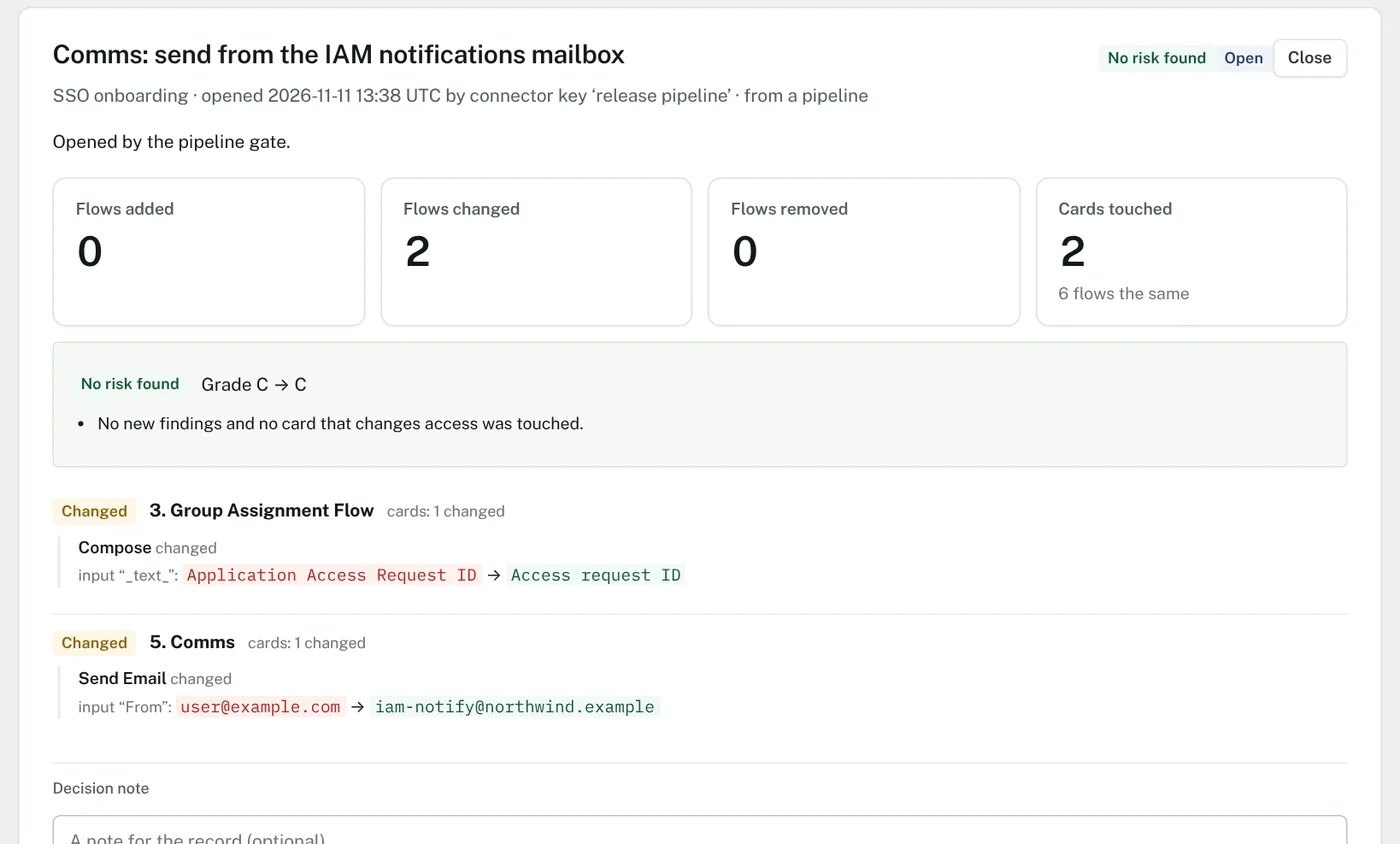
Each time you upload a folder or flow export, Assay keeps it as a version and shows the difference from the one before, card by card: flows added and removed, each card’s changed inputs, and whether the change touches a card that changes access. A change request holds that difference for someone else to approve or reject. A pipeline can send each export with a key and stop on the answer.
Use it when
- Someone asks what changed in a flow between the version that worked and the one that did not.
- Your policy says nobody approves their own change to a flow that grants or removes access.
- A release pipeline should not import a folder until a reviewer has said yes.
- What it needs
- The export, uploaded by a person or sent by a pipeline.
- Where it stops
- Assay compares exports. It does not see edits made in the console until the next export arrives.
Dry run
Govern → Dry run
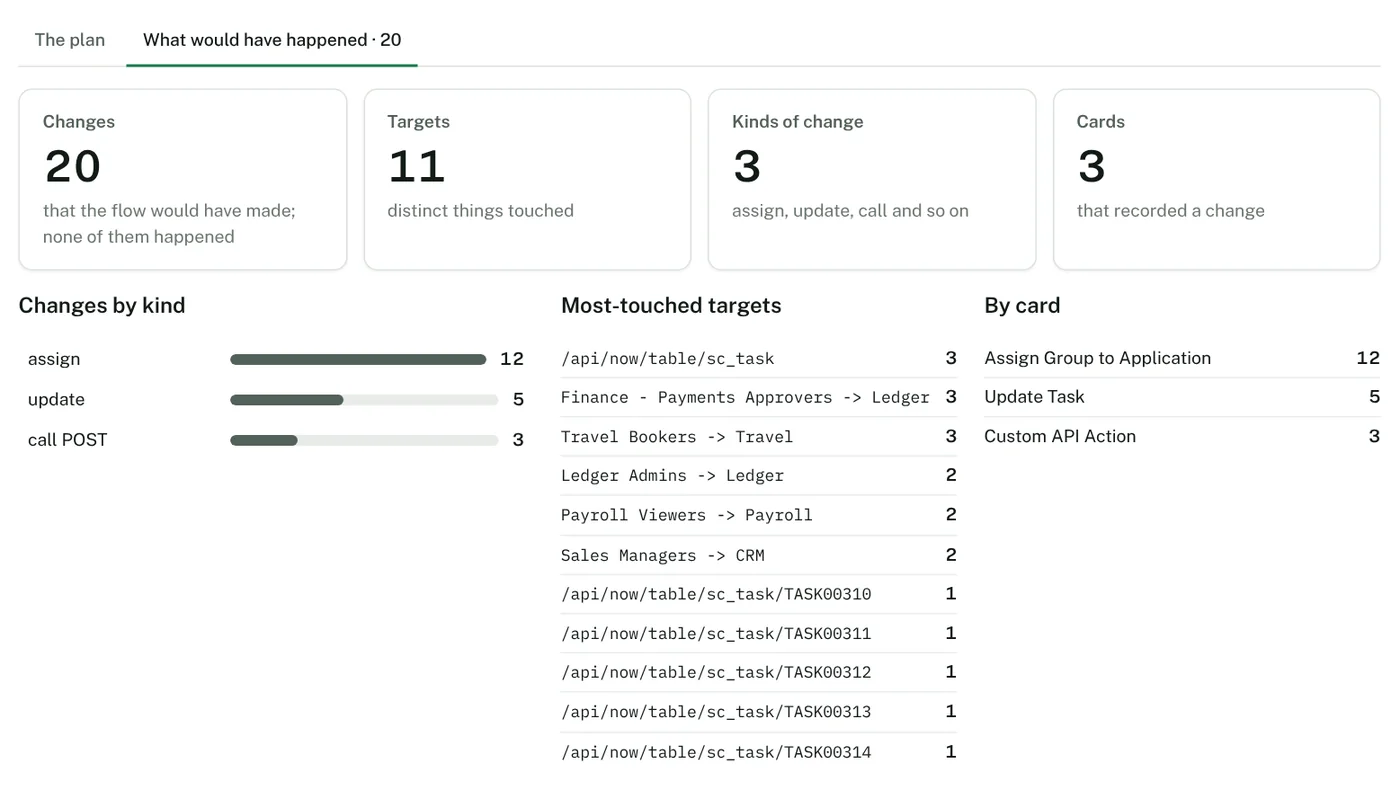
Assay builds a safe copy of a flow. Every card that would change something is replaced by a card that writes a row to a dry-run table; every read stays; the helper flows it calls are copied the same way. You import the copy into a test folder, run it, export the table and upload it. Assay then shows what the real flow would have done.
Use it when
- Before the first run of a clean-up flow: see which users and groups it would touch.
- After a change to a filter or a condition: confirm the list of targets is the one you expect.
- A reviewer wants to see the effect of a flow before approving it.
- What it needs
- A flow from a saved assessment, or an export.
- Where it stops
- You run the copy in your own Okta org; Assay runs nothing. A card Assay does not recognise is treated as one that changes something, and is recorded instead of run.
Promote
Govern → Promote
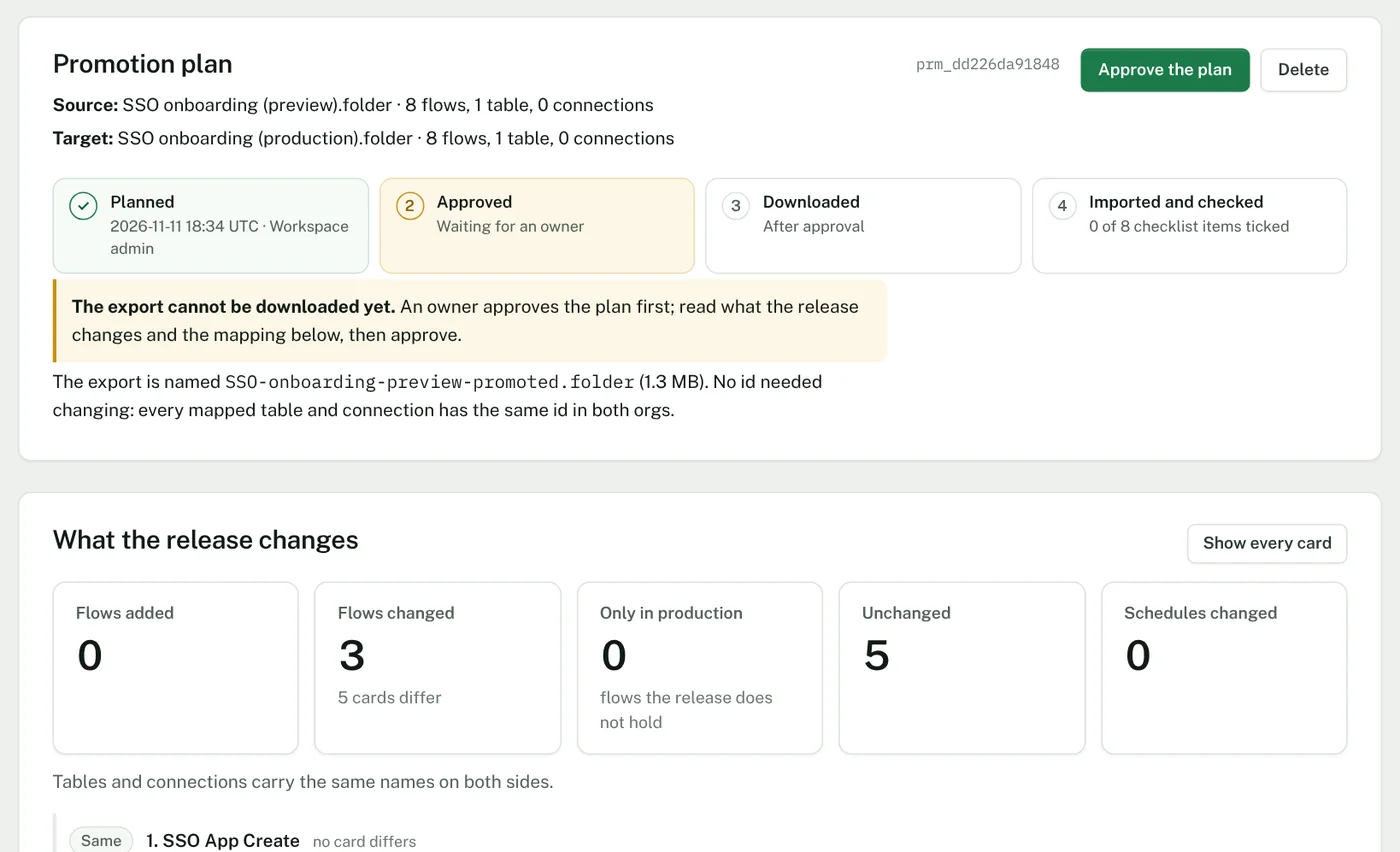
Give Assay the export from a preview org and the export from production. It writes a promoted export in which connections and tables point at production’s, matched by name, and lists anything it could not match. The export cannot be downloaded until an owner has approved the plan; the plan then shows who approved, who downloaded, and how far the console checklist has got.
Use it when
- Moving a folder from preview to production without picking every connection and table again by hand.
- Checking, before an import, which connections or tables do not exist in the target org.
- Keeping a record of what was promoted, by whom, and who approved it.
- What it needs
- Two exports: the source folder and the same folder from the target org.
- Where it stops
- You import the file and re-authorise its connections in the console yourself. Assay does not write to Okta.
Compare orgs
Govern → Compare orgs
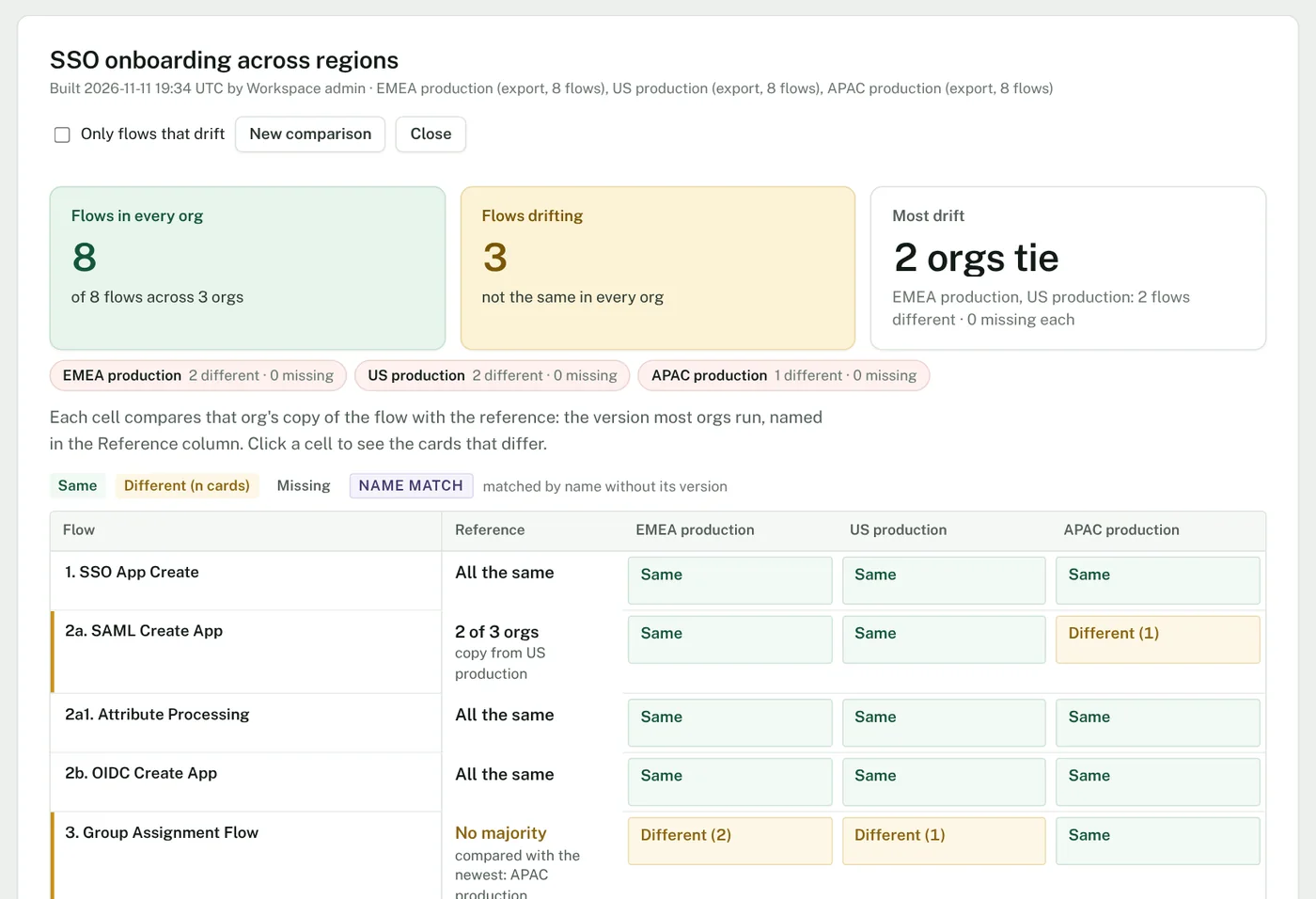
Upload the same folder from two or more orgs. Assay lines the flows up and shows, for each org, which are the same and which differ, down to the card. A Reference column names the version most orgs run, and says so when no two orgs agree.
Use it when
- Several regions or business units run “the same” flows and you need to know whether they still are.
- A fix went into one org after an incident: find the orgs that did not get it.
- Before merging orgs: list what actually differs, not what people remember.
- What it needs
- One export per org, each with a label.
- Where it stops
- It reads exports only, so it compares what each org held when its export was taken.
Guardrails
Limits on what a flow, an agent or a campaign may do, decided before it does it.
Run limits
Govern → Run limits
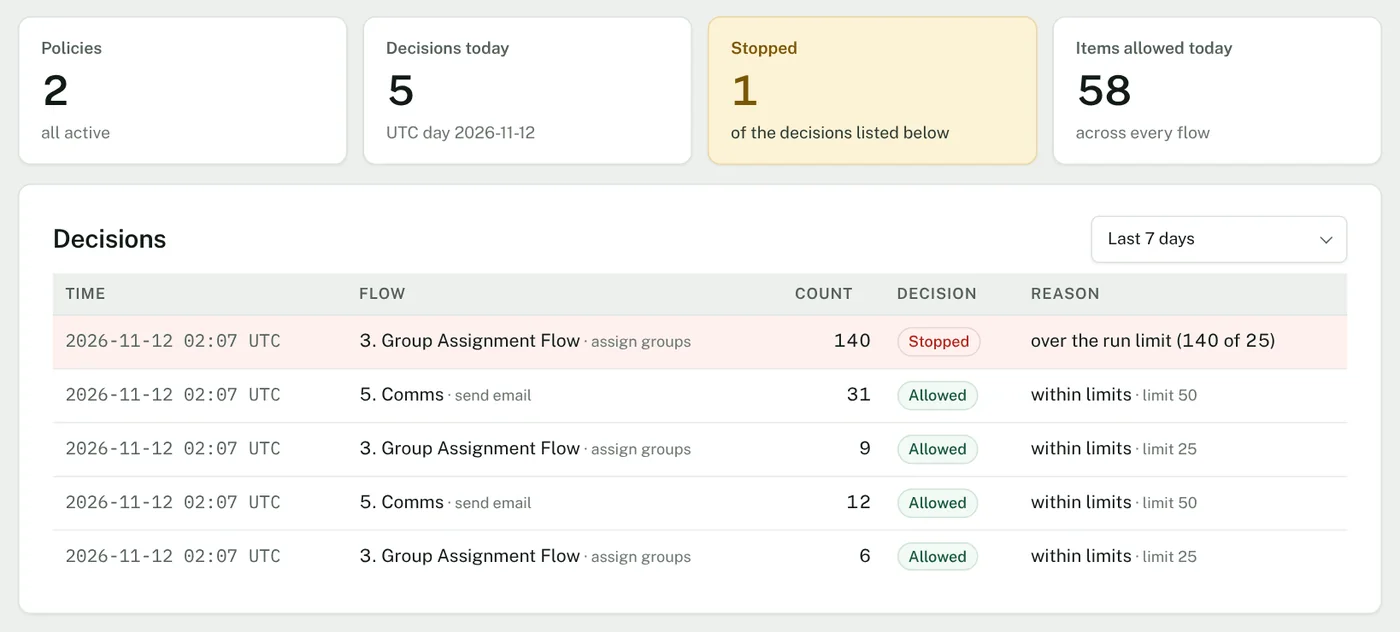
A flow asks Assay before it changes Okta, and says how many items it is about to act on. Assay answers allow or stop, against the limits you set for that flow and action: the most items in one run, and the most in a day. A limit can be learned from the last 30 days of runs. Every decision is recorded.
Use it when
- A leaver flow that normally handles ten people must never deactivate four hundred because a feed was wrong.
- A bulk group-removal flow needs a ceiling for the day.
- You want a record of each time a flow was stopped, and the count that stopped it.
- What it needs
- One card in the flow, before the step that changes something: the Assay connector’s Guard card, or an API call.
- Where it stops
- It works only for flows that ask. Assay cannot stop a flow that does not call it.
AI agents
Govern → AI agents
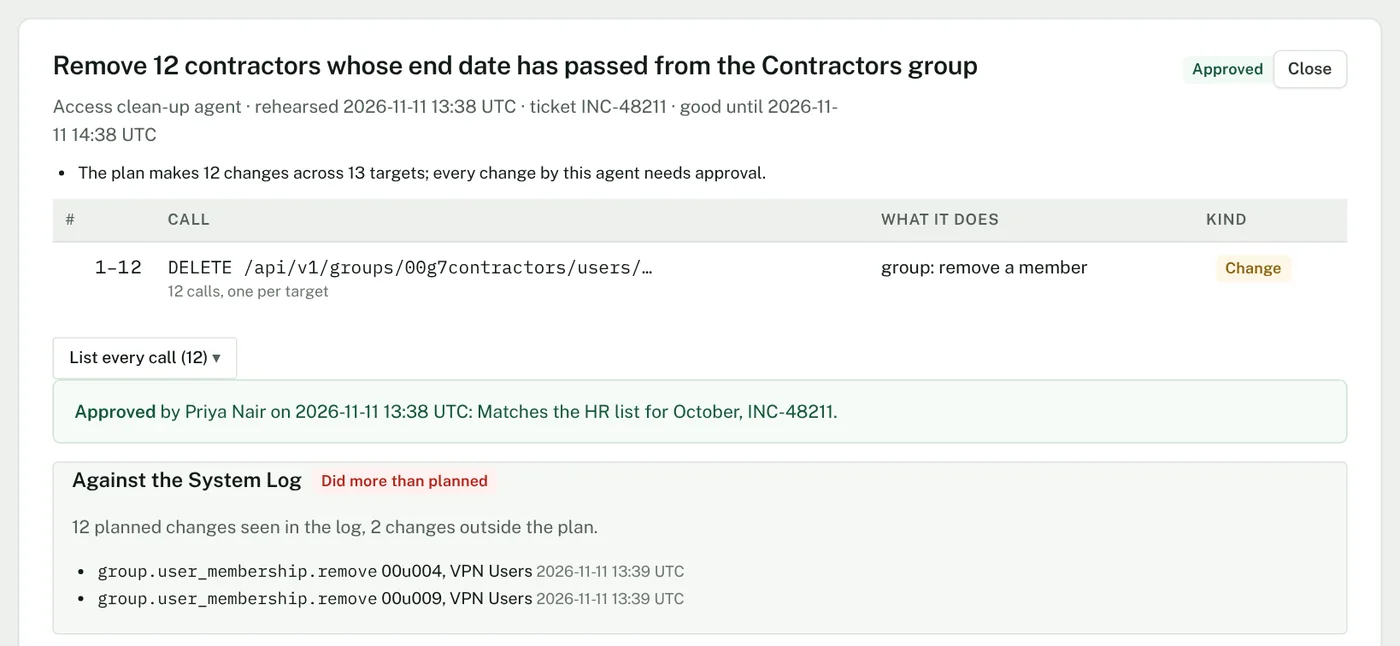
An AI agent that manages Okta sends Assay the calls it intends to make. Assay turns them into a plan a person can read: what each call does and how many targets it has. A person approves what needs approval. Afterwards the System Log is read back against the plan: what was planned, what happened, and anything done outside it.
Use it when
- An agent proposes removing a group from twelve contractors: someone sees the list and approves it first.
- You need evidence that an agent did only what was approved.
- Reads may pass; changes wait for a person.
- What it needs
- The agent sends its plan (there is an endpoint for agents that use the Model Context Protocol). Afterwards, a System Log export.
- Where it stops
- Assay does not sit between the agent and Okta and holds no Okta credential. An agent that does not ask is seen only when the System Log is checked.
Campaign simulator
Govern → Campaign simulator
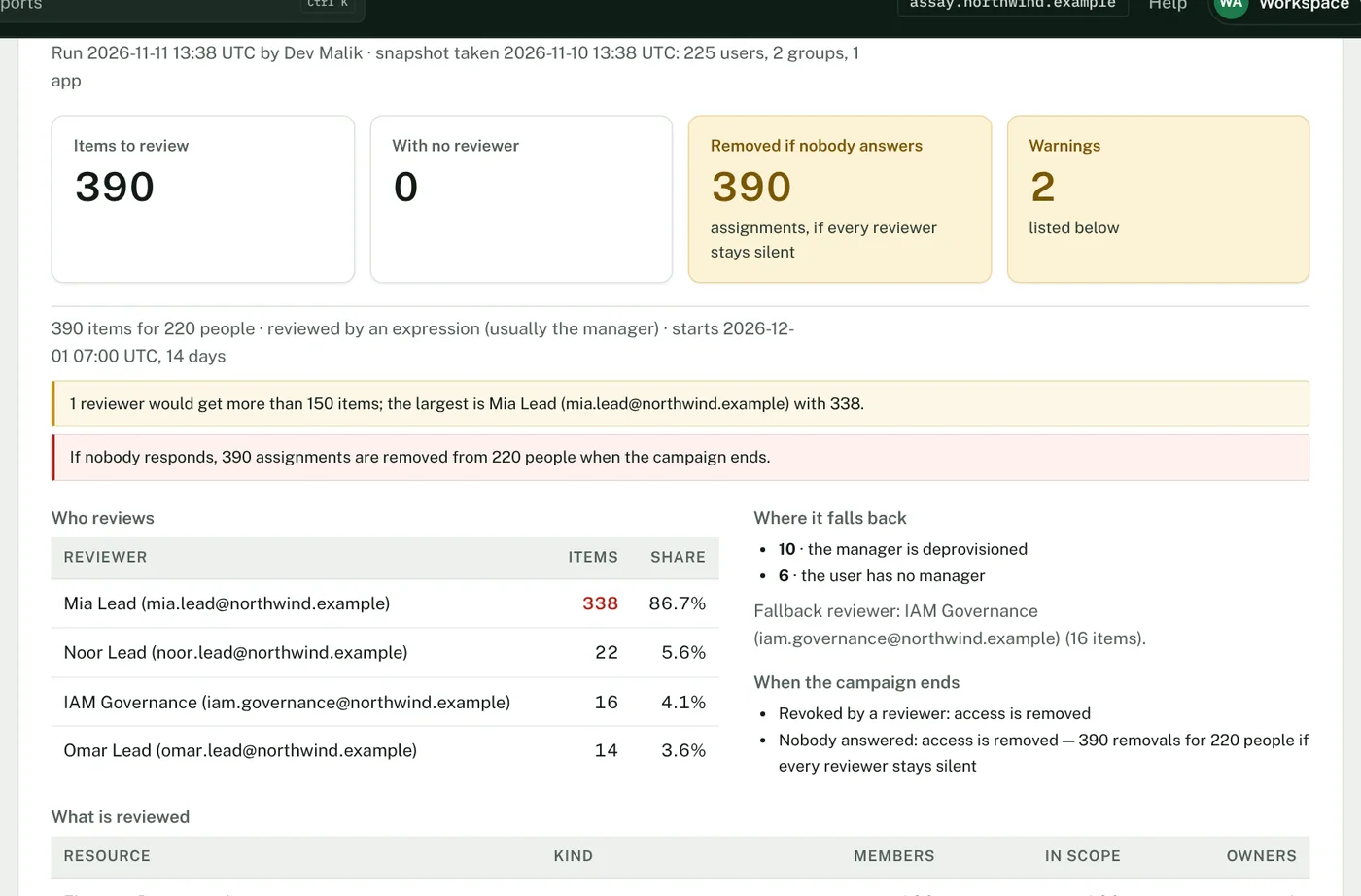
Give Assay the definition of an access certification campaign and a snapshot of users, groups and app assignments. Without launching anything, it works out how many items there are to review, who reviews how many, who has no reviewer and where those items fall back to, and what is removed if nobody answers.
Use it when
- Before launch: find the one manager who would receive 338 items.
- Find the people whose manager is missing or deactivated, before their items land on a fallback reviewer.
- Know how many assignments are removed, from how many people, if reviewers stay silent.
- What it needs
- The campaign definition as JSON, and a snapshot as JSON or CSV files. A sample snapshot is in the product.
- Where it stops
- It is a simulation of the definition against the snapshot. Okta decides the real assignments when the campaign launches.
Monitoring
What ran, what failed, and what your tables held yesterday.
Runs, run alerts and search
Monitor → Runs, Run alerts, Search runs
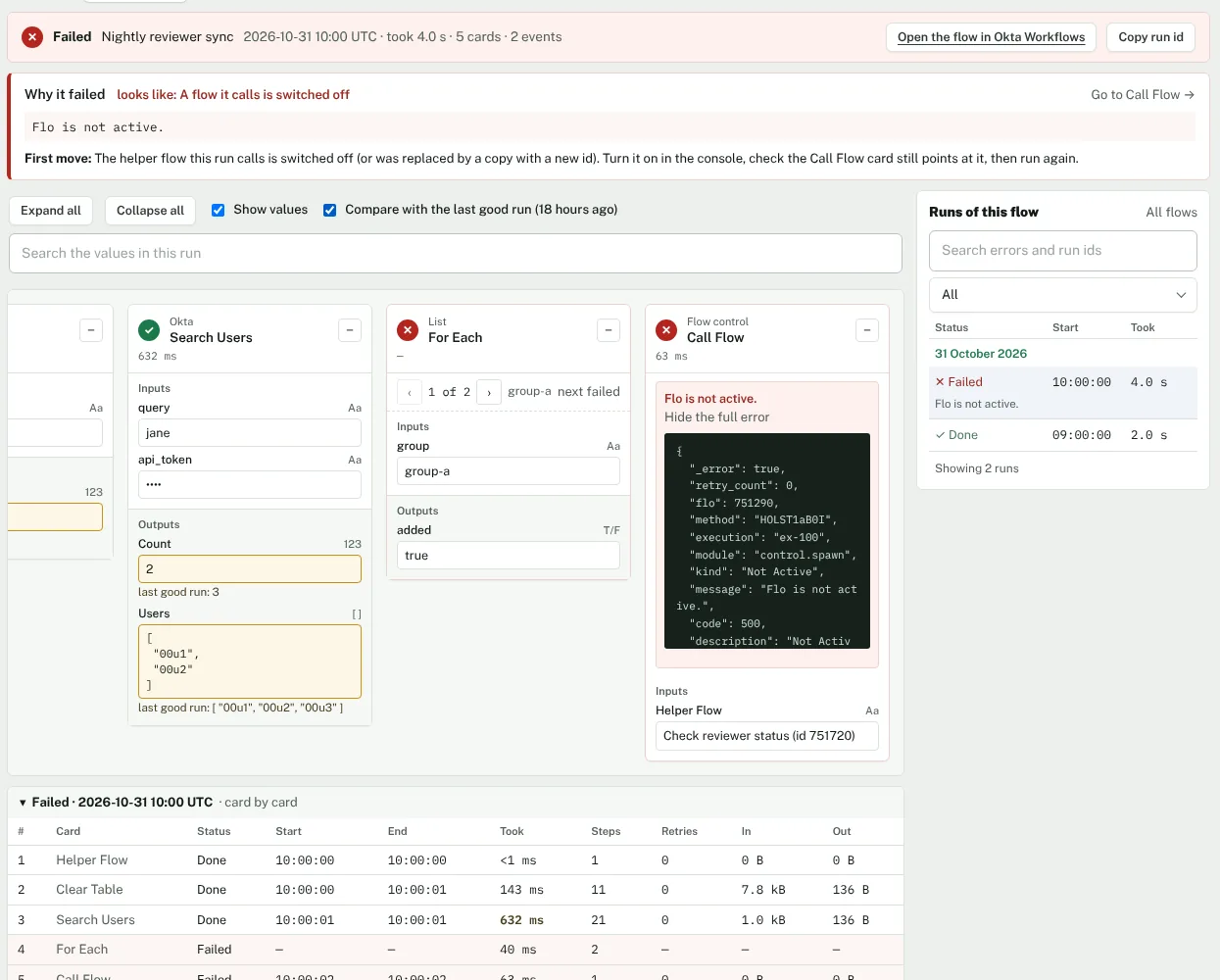
Runs your org sends to Assay are shown with each failure traced to the card, next to what the assessment predicted for that card. Run alerts learns what each flow normally does and tells you when a schedule did not fire or a run failed quietly; it never blocks a flow. Search finds every run and table row that mentions a login, an email address, a user id or a group name.
Use it when
- A nightly flow stopped running last Tuesday and nobody noticed.
- A flow still “succeeds” but has started handling zero items.
- The service desk asks what your automation did to one person.
- What it needs
- Your Okta org sends runs to Assay with a key Assay gives you. Okta sends; Assay never asks.
- Where it stops
- Alerts and search start once runs arrive; a flow’s pattern is learned from its last 30 days. What you type into search is not logged.
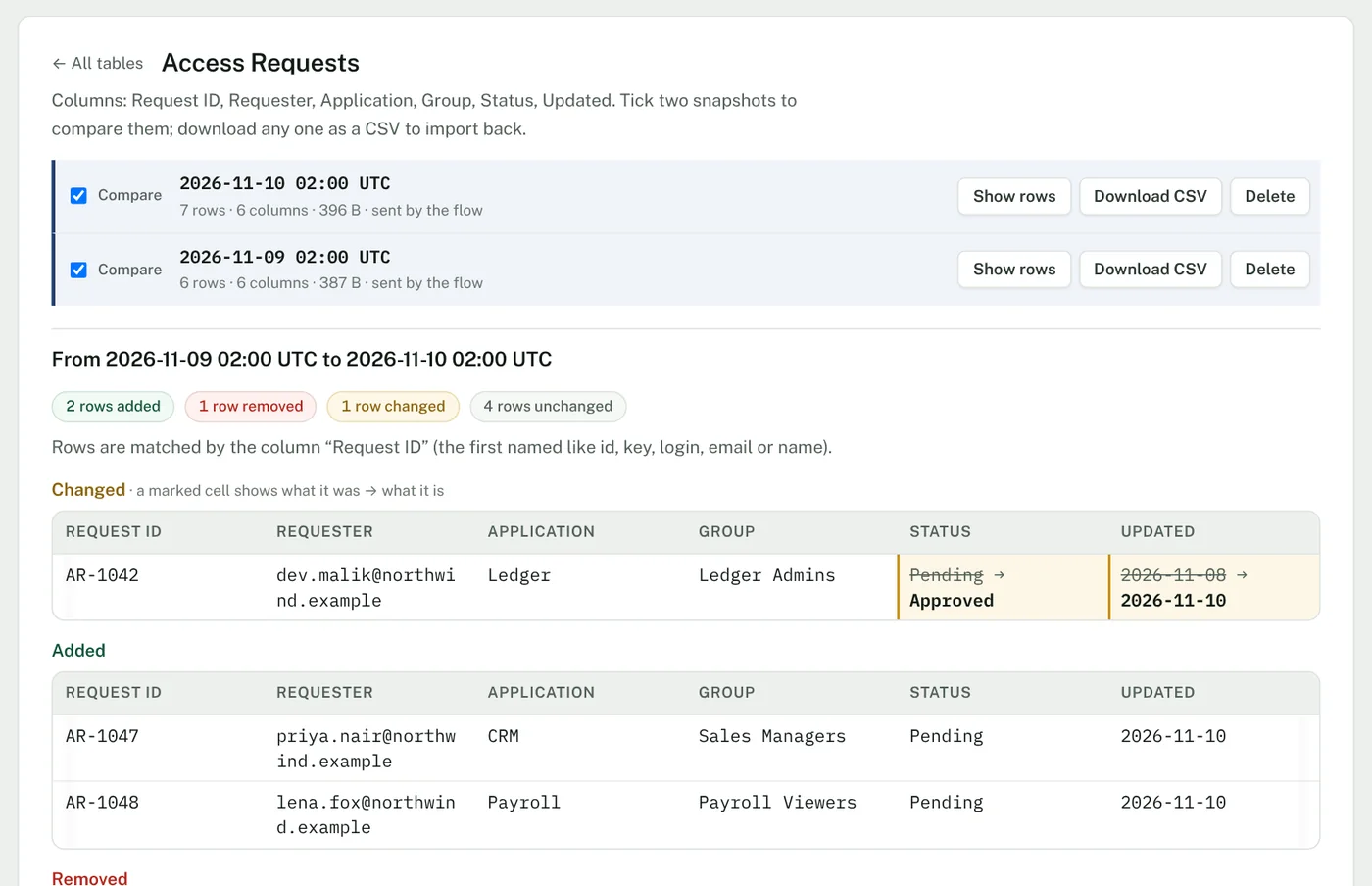
Table snapshots
Monitor → Table snapshots
Okta Workflows tables have no history. Assay keeps a snapshot of each table, from a template flow that sends one every day or from a CSV you upload. It shows the difference between any two snapshots (rows added, removed and changed) and gives any snapshot back as a CSV.
Use it when
- A flow overwrote a configuration table and you need yesterday’s rows.
- Someone asks when a request’s status changed.
- Before a risky change: take a snapshot you can restore from.
- What it needs
- The template flow, or the table’s CSV export from the console.
- Where it stops
- Assay never writes to Okta. Restoring is an import you do in the console.
Evidence
The estate written down for an auditor and for the engineer who inherits it.
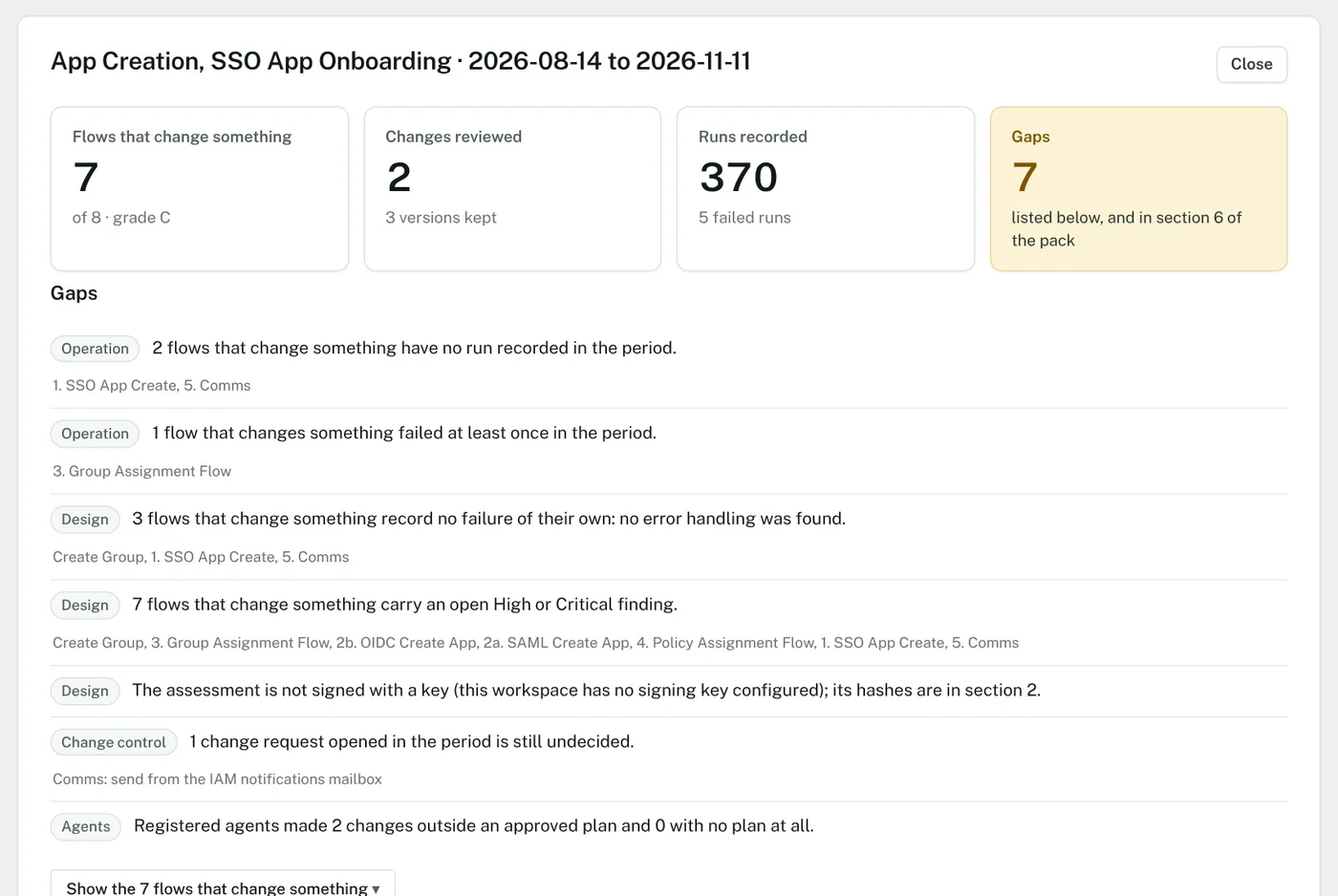
Audit evidence
Evidence → Audit evidence
One pack for a period you choose: which flows can change access, which changes were reviewed and by whom, what ran and what failed, and a section that lists what is missing. As a page and as a PDF.
Use it when
- An audit asks for evidence of change management over automated identity changes.
- Quarterly evidence, without collecting screenshots.
- You want the gaps listed before the auditor finds them.
- What it needs
- A saved assessment. Changes and runs add their sections when you use them.
- Where it stops
- Every line is a fact the workspace holds for the period. The pack does not attest that a control works; your auditor decides that.
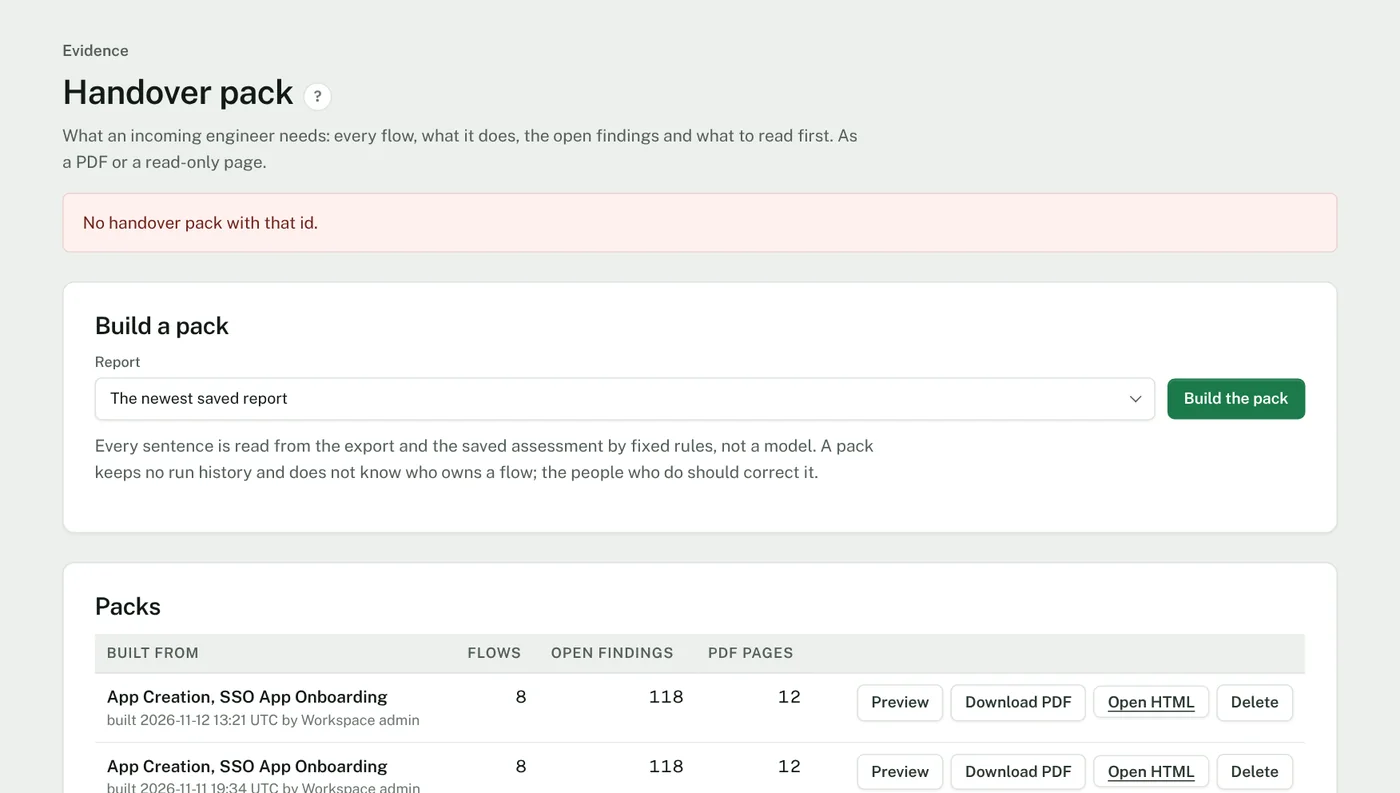
Handover pack
Evidence → Handover pack
The estate written down for the engineer who inherits it: what each flow does, which flows start on their own, what calls what, which flows read and write each table, the open findings in priority order, and what to read in the first week. As a PDF or a read-only page.
Use it when
- The person who built the flows is leaving.
- A partner takes over an estate, or hands one back.
- A new engineer joins and needs a reading order.
- What it needs
- A saved assessment.
- Where it stops
- Every sentence is read from the export and the assessment by fixed rules, not by a model. It does not know who owns a flow or why it exists.
Build
For teams moving automation into Okta Workflows from another product.
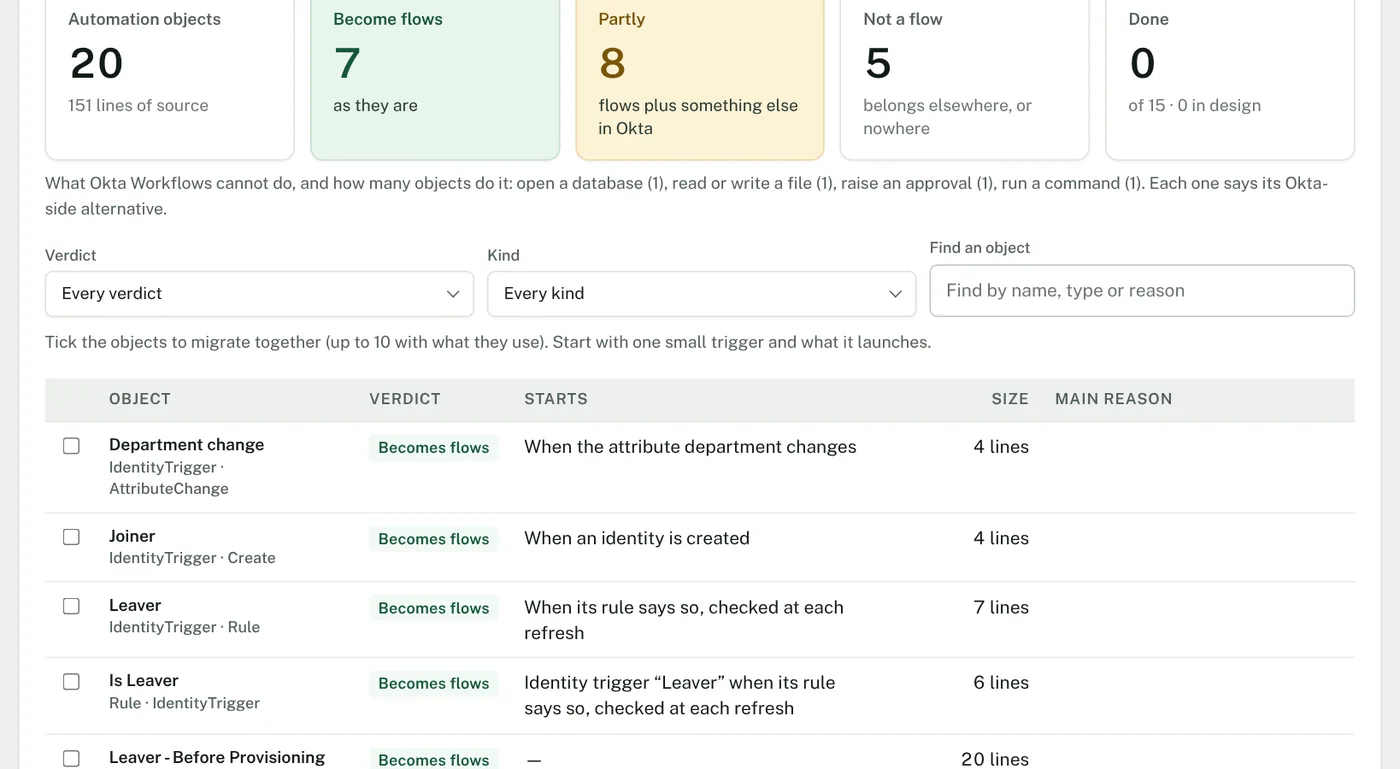
Migrate
Build → Migrate
Upload an export of the rules and workflows from an older identity governance product. Assay lists every automation object with a verdict: it becomes a flow as it is, it becomes a flow plus something else in Okta, or it is not a flow, each with the reason. Pick a small group and Assay Studio designs the flows for it.
Use it when
- Planning a move to Okta: size the work before you commit to a date.
- Find early the objects that cannot be a flow, such as a database write, a file read or an approval, each with its alternative in Okta.
- Migrate in small groups: one trigger and what it launches.
- What it needs
- The export file from the source product.
- Where it stops
- It is an inventory and a design, not a converter. Nothing is translated line for line.
Which plan
These are part of Workspace and Enterprise. Two are in Build as well: comparing two exports before a change goes live, and Migrate, which is part of Assay Studio. See pricing.
Also under Assess: Deprecations
When a card or a connector version is announced for retirement, add the notice once. Assay lists the flows in every saved export that still use it, with what replaces it. You add the notices: Assay does not read vendor announcements.
About the pictures
Every picture shows the product on sample data; the names and addresses in them are invented. Okta and Okta Workflows are trademarks of Okta, Inc. Assay is independent of Okta.
See them on your own export.
These features are not in the public demo, which shows the assessment. We will walk you through them on a sample workspace, or on an export you bring.